Live Star Doll Dress Up
How to play
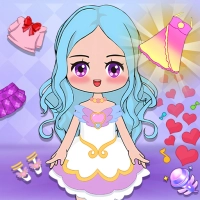
1. Tap the Play button on the main menu to enter the dressing room. Your doll will be waiting in a basic outfit, ready for your creative touch.
2. Browse the clothing categories at the bottom of the screen, such as Tops, Bottoms, Dresses, and Shoes. Tap any category to open its collection of trendy items.
3. Scroll through the available pieces by swiping left or right. Tap on any clothing item to instantly dress your doll. Tap again to remove it and try something else.
4. Switch to the Accessories tab to add jewelry, bags, hats, and wings. Tap each accessory to place it on your doll. Mix and match until you love the look.
5. Enter the Makeup section by tapping the makeup icon. Choose from lipsticks, eyeshadows, blush, and more. Tap each color or style to apply it to your doll's face.
6. Personalize further in the Hairstyle menu. Swipe through different cuts and colors, then tap to change your doll's hair. You can also pick hair accessories here.
7. Use the Background tab to change the scene behind your doll. Tap a backdrop like a castle, garden, or stage to set the mood for your creation.
8. Adjust the doll's pose by tapping the Pose button. Swipe through options and tap to select a stance that shows off your outfit best.
9. Tap the Palette or Color icon on any clothing or accessory to change its hue. Slide your finger over the color wheel, then tap to confirm the new shade.
10. Once you are happy with the full look, tap the Camera button to take a screenshot of your doll. Save the image to your device or share it with friends.
11. To start over, tap the Reset button. This clears all clothing, makeup, and accessories so you can begin a fresh makeover session.
12. Explore new items regularly by checking the Shop tab. Tap to unlock additional outfits, makeup styles, and backgrounds using in-game coins or rewards.